
RTAMeter

$20.00

Category:

RTA Meter

Analyze the room. Ring it out.

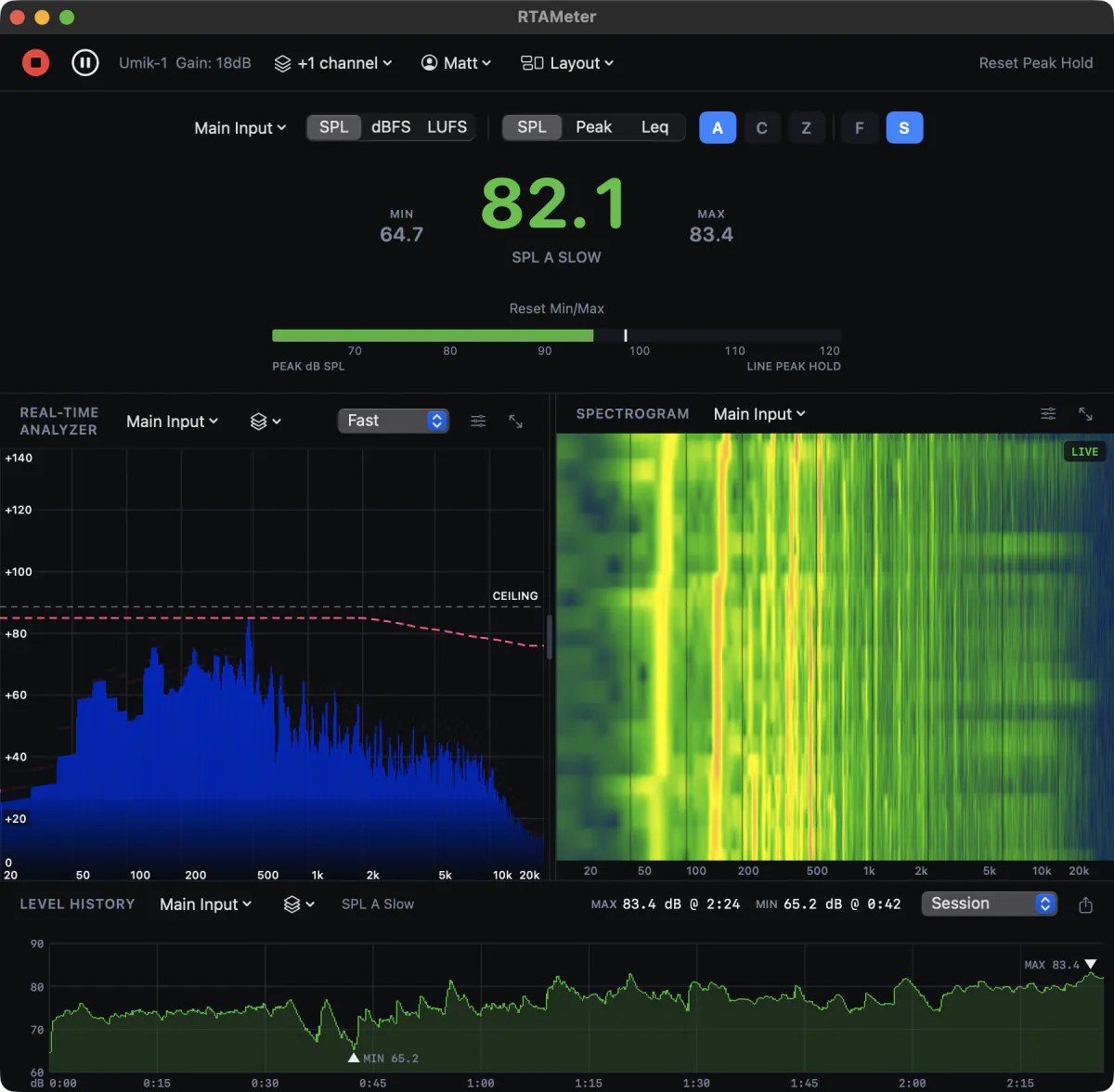
A real-time analyzer, SPL meter and loudness meter for the Mac. Spectrum, spectrogram, Leq, LUFS and Ring-Out feedback detection, on as many channels as you need, from a calibrated USB mic, any mic through your interface, or a digital feed from the console.

14 days, every feature, no credit card. One-time purchase, no subscription.

RTA Meter
macOS ✓ Calibrated SPL and LUFS ✓ Many channels at once ✓ Feedback detection built in ✓ Native Apple Silicon app Version 1.3.1 available now

Everything it does

Find your problem below. Most people never need to read further than this.

Measure

SPL meter

A, C and Z weighting, Fast or Slow, in dB SPL or dBFS

A, C and Z frequency weighting with Fast or Slow time weighting, and Min and Max since Start. The filters are derived from the IEC 61672-1 analog prototype. A clip warning tells you when the input itself is overloading.
Peak and Leq

Peak C or Z, and Leq from 1 second to 24 hours

C- or Z-weighted Peak, and a Leq accumulator with a window you set anywhere from one second to 24 hours.

Loudness

LUFS to EBU R128: Momentary, Short-Term, Integrated, LRA, True Peak

Switch any channel to LUFS to check a broadcast, streaming or podcast mix to ITU-R BS.1770 and EBU R128. Momentary, Short-Term and Integrated loudness, Loudness Range and True Peak, against a target you choose: EBU R128, ATSC A/85, streaming, podcast or your own.

See

Spectrum

Full octave to 1/48 octave, with peak hold

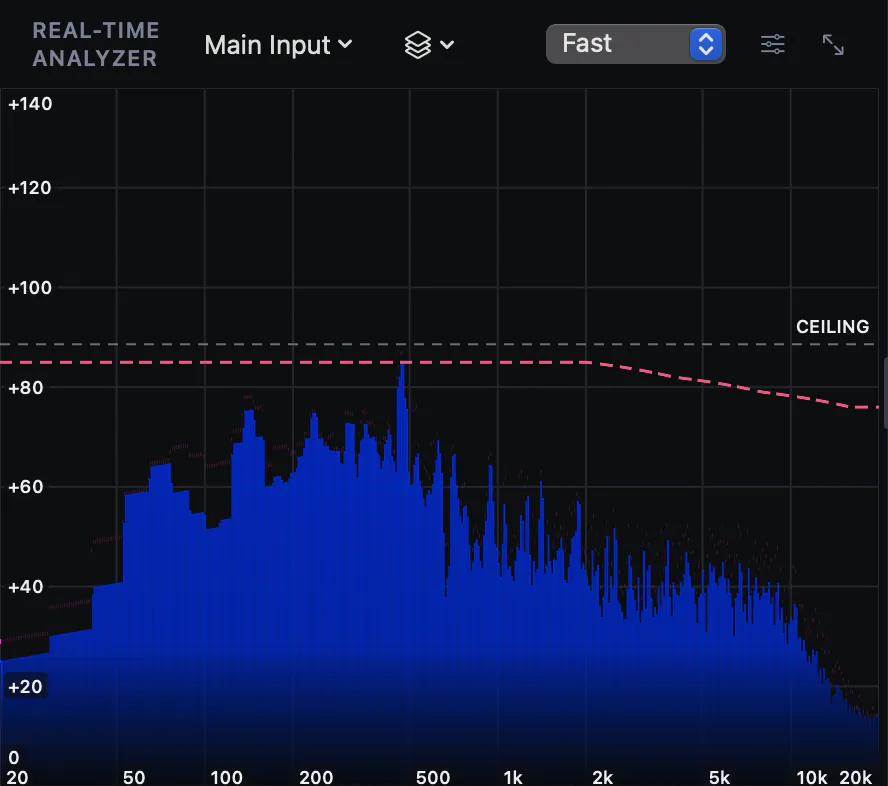
Fractional-octave banding from 1/1 to 1/48, a line trace, or both at once, with peak hold, a hover readout, and other channels overlaid in their own colours.

See it in action ↓

Spectrogram

Two minutes of history, scrollable, with saveable colour presets

A scrolling time and frequency heatmap under the spectrum, on the same frequency axis. A sustained tone holds its position and shows as a bright streak.

Target curves

Including the cinema X-Curve

Overlay a target curve on the spectrum, including the cinema X-Curve (SMPTE ST202 and ISO 2969), with an adjustable reference level.

Act

Ring-Out

Feedback detection with the frequency and the note

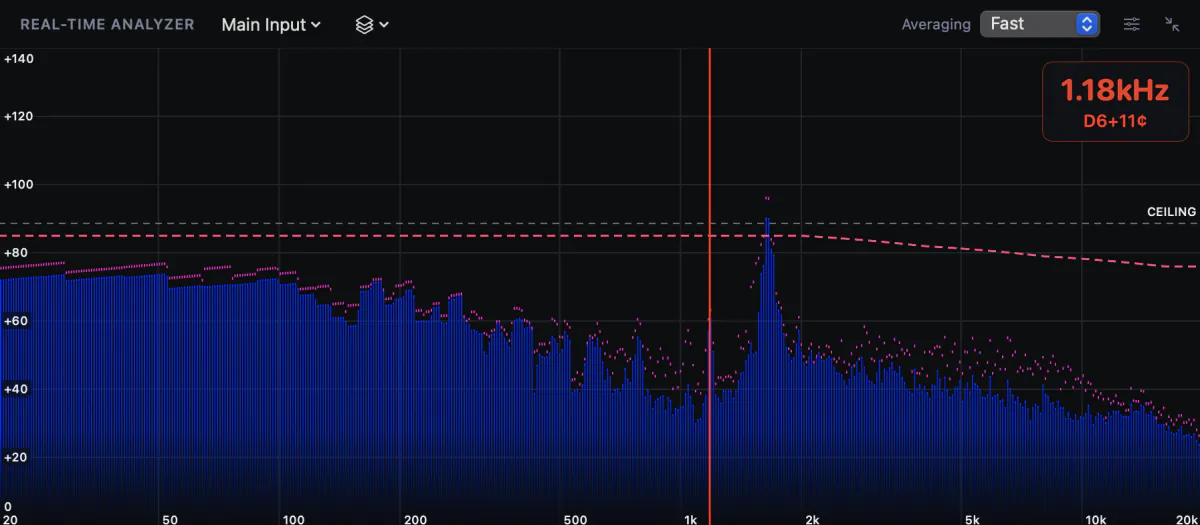
Detects tones that keep growing while ignoring music, then shows the frequency and the nearest note with its offset in cents. On or off per channel, with adjustable sensitivity.

See it in action ↓

Traffic light

Your own thresholds and colours, in SPL, dBFS or LUFS

Set the thresholds, in SPL or in dBFS, and the colours for each range, so anyone glancing at the screen knows where the room stands. Loudness channels turn green on target, red above and yellow below.

Level history

The whole session graphed, with MAX and MIN marked

Graphs the meter from Start to Stop, for whichever weighting or metric it shows, on every channel. Zoom from the whole session down to ten seconds, and jump to the loudest or quietest moment.

See it in action ↓

Connect

Multichannel

Several mics and console feeds at once, each in its own window

Add as many channels as your devices provide, each with its own name, colour, calibration, gain and weighting. Show one on the meter, another on the spectrum, or open any channel in its own window with the layout you want.

Stereo and digital feeds

Stereo pairs, console buses, network audio and loopback

Read a left and right pair as one stereo source, power-averaged so out-of-phase content does not show false notches. Console buses, network audio and loopback inputs read in dBFS automatically.

System Output

Measure what the Mac is playing, no driver needed

Analyse whatever apps on the Mac are playing, with no loopback driver to install. Requires macOS 14.2 or later.

Set up and report

Mic calibration

Mic calibration files, or a reference tone

Load the calibration file that came with a USB measurement mic, or calibrate against a reference tone for higher precision. Changing the preamp gain is compensated automatically on interfaces that report it, so there is no need to recalibrate.

Reports

PDF, PNG or text, with Leq, L10, L50 and L90

Export a session as a PDF report, a PNG image or summary text: input, calibration, MAX and MIN with their time, session Leq, L10, L50, L90 and time spent above each threshold, one page per channel.

Profiles

Save a whole setup and recall it in one click

Save every setting under a name and switch between setups from the menu bar. Export a profile to move it to another Mac, or share one Mac without touching each other’s calibration.

Spectrum

A real-time analyzer that stays out of the way

One dark window, one big SPL number, and the spectrum underneath it. Switch between bands and a fine line trace, hold the peaks, overlay a target curve such as the cinema X-Curve, and hover anywhere to read the exact frequency and level. Resolution runs from full octave to 1/48 octave, and you can lay other channels over it in their own colours, say the measurement mic against the console feed.

Ring-Out

Catch feedback before the room does

Ring-Out watches for tones that keep growing and shows the frequency the moment one is confirmed, with the nearest musical note and how many cents off it is. A loud tone that holds steady never triggers it, and neither does music: notes with vibrato or overtones are ignored. Turn it on per channel and set the sensitivity to Low, Normal or High. The alert is visual only, because an audible one is useless in a loud PA environment.

Level History

See the whole show, not just this second

Level History graphs the SPL meter from the moment you press Start, coloured by your traffic-light thresholds, with the loudest and quietest moments marked. Hover to read the time and level at any point, zoom from the whole session down to ten seconds, and click MAX or MIN to jump straight there. Every channel keeps its own history, and the session exports as a PDF report with Leq, L10, L50 and L90 and the time spent above each threshold.

Details

Collapsed so the page stays short, still on the page for search.

Technical specifications
WeightingA, C, Z
Time weightingFast, Slow
RTA averagingFast, Slow, Infinite, None
Bands1/1 to 1/48 octave
Leq window1 second to 24 hours
LoudnessITU-R BS.1770, EBU R128: M, S, I, LRA, True Peak
ChannelsAny number, mono or stereo
Spectrogram2 minutes of history
Level historyWhole session, 0.1 s detail for 4 hours
ReportsPDF, PNG, text
PlatformmacOS 13+, Apple Silicon (System Output: macOS 14.2+)
System requirements
A Mac with Apple Silicon running macOS 13 Ventura or later (macOS 14.2 or later for System Output). A USB measurement mic with a calibration file, or any mic through an audio interface.
Which microphone do I need?
A USB measurement mic that comes with a calibration file is the simplest, since that file sets the level on its own. Any other measurement mic through an audio interface works too, calibrated against a reference tone.
Can I measure several mics, or a console feed, at the same time?
Yes. Add a channel for each input, from one device or several, and give each its own calibration. A console feed over network audio sits next to your measurement mic, and any channel can have its own window.
Can it check loudness for broadcast or streaming?
Yes. Switch a channel to LUFS and it reads Momentary, Short-Term and Integrated loudness, Loudness Range and True Peak to ITU-R BS.1770 and EBU R128, coloured against your target.
Does it run on Windows or Intel Macs?
Not at this time. RTA Meter is a native app for Apple Silicon Macs running macOS 13 or later.
Does it make a sound when it finds feedback?
No. Ring-Out is visual only, on purpose. An audible alert would be lost in a loud PA environment.
Can I leave it running all night?
Yes. It is built to be left running during a show, and it rechecks its licence quietly in the background. Level History keeps the whole run, so afterwards you can see exactly when it got loudest, and export it as a report.

Download the free trial

The same build for every platform. 14 days, every feature, no credit card. Your licence key unlocks the app you already installed.

Currently version 1.3.1, released 2026-10-08.

macOS

Apple Silicon · macOS 13+

Download for macOS Signed and notarised

Find out what the room is doing.

Download the trial, plug in your measurement mic, and read the room at your next soundcheck.
