Wave Copilot

$39.99

Finish the paperwork before you leave set. Batch metadata, poly splitting, timecode rescue, a 64-channel mixer and sound reports, in one desktop app. One-time purchase, no subscription. Windows, macOS and Linux.

Category:

Production sound toolkit

Finish the paperwork before you leave set.

Batch metadata, poly splitting, timecode rescue, mixing and sound reports. One app for the whole handover.

14 days, every feature, no credit card. One-time purchase, no subscription.

Wave Copilot
Windows, macOS, Linux No subscription Works offline Originals never touched Version 1.1.0 available now

Everything it does

Find your problem below. Most people never need to read further than this.

Timecode rescue

Audio TC

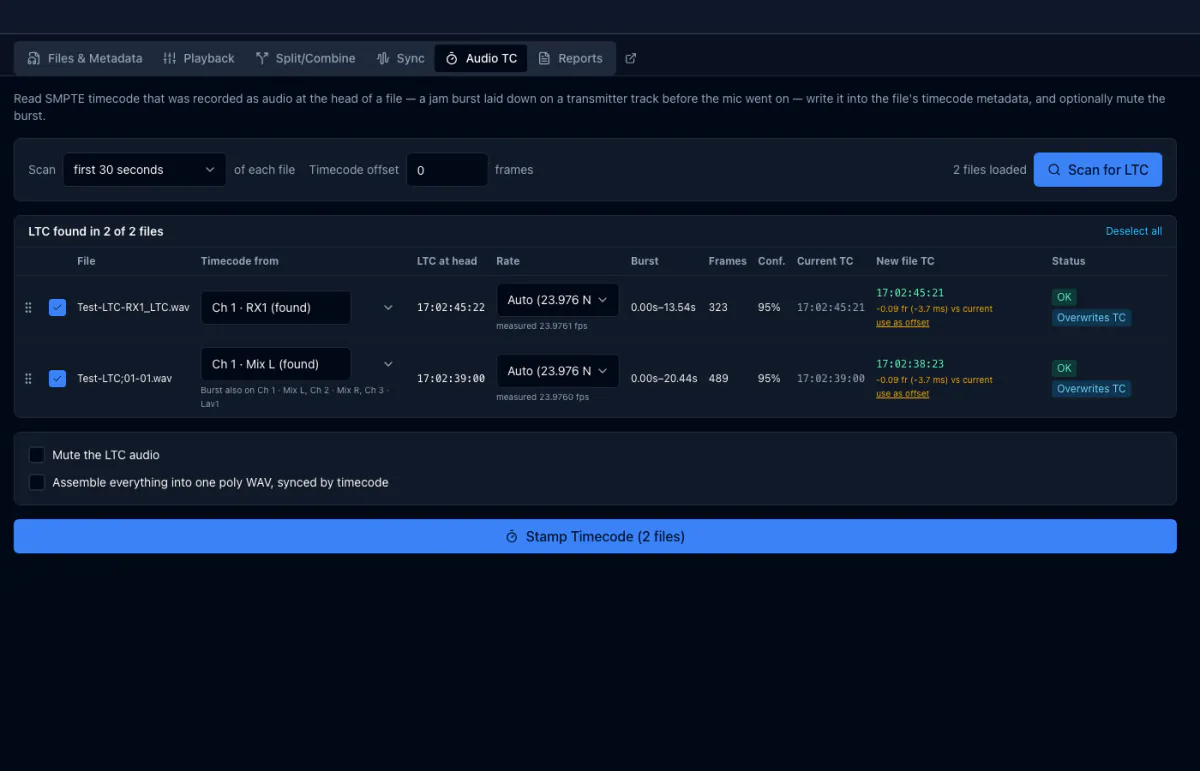
Decode a jam burst into real timecode

Recorded a timecode jam onto a spare track? Wave Copilot finds the burst, decodes it, and writes real BWF timecode into the file. No hardware box required.

See it in action ↓
Conform backups

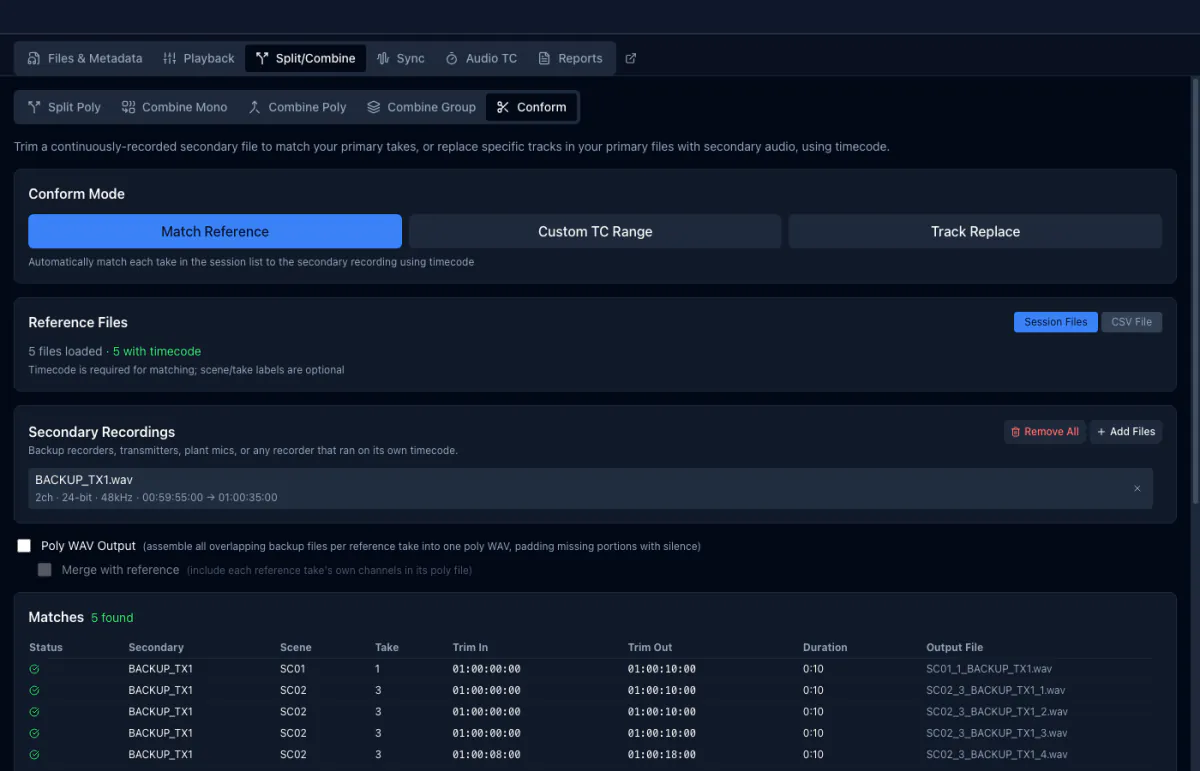
Trim a continuous recorder to your takes

Trim an all-day backup recording down to the takes your main recorder made, matched by timecode. It can also replace a single bad channel inside a poly, or recover a take the main recorder missed entirely.

See it in action ↓

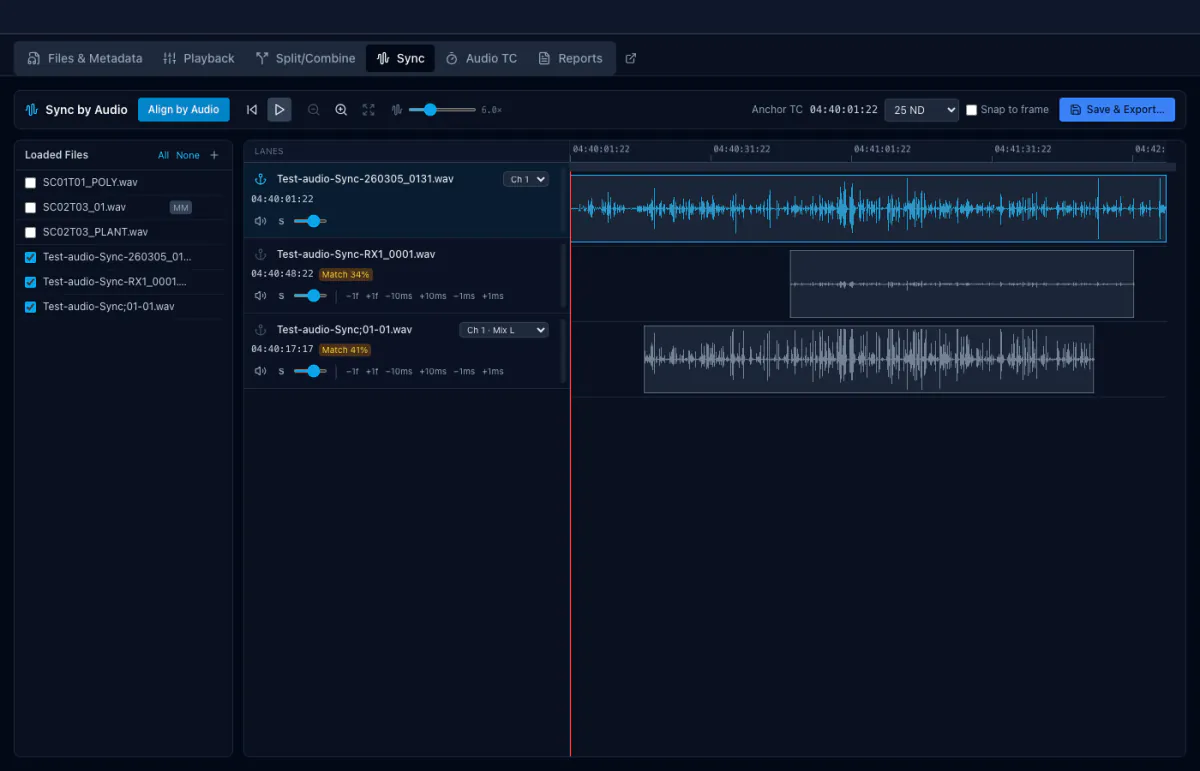
Sync by audio

Align files that share no clock

Cross-correlates the actual audio to align files that never shared a clock, with a confidence score for each one. Check it by ear through a synchronised mix, then write proper timecode into the originals.

See it in action ↓

Channels and files

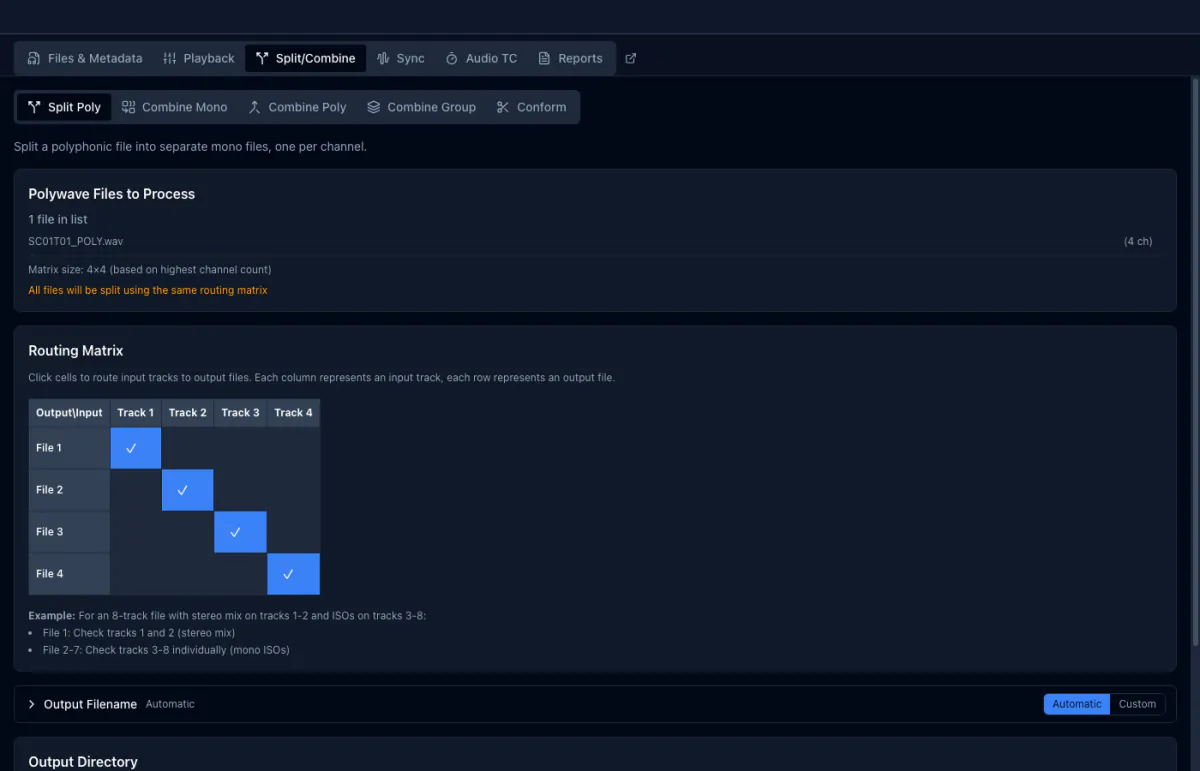
Split poly

Any poly file into mono stems

Turn any polyphonic WAV into one mono file per channel, named from your own template. Timecode, metadata and track names follow each channel out.

See it in action ↓

Combine anything

Mixed channel counts into one poly WAV

Merge mono files, two polys, or a mixed pile of both into a single polyphonic WAV. Grouping is automatic by timecode and length, and you can reorder the channels before it writes.

See it in action ↓

RF64 + 32-bit float

Files past 4 GB, float intact

Reads and writes RF64, so long takes past 4 GB open properly instead of truncating, and keeps 32-bit float intact end to end. No silent clipping of the peaks you recorded headroom for.

Mixing

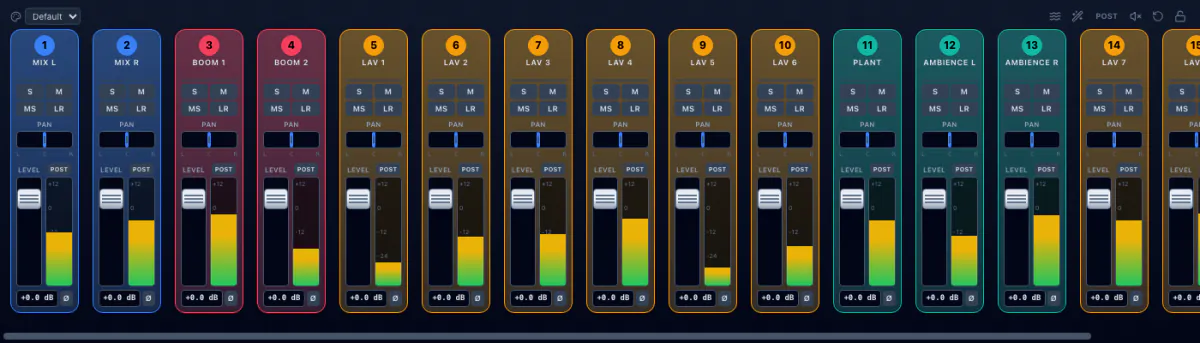
64-ch mixer

Gain, pan, solo, mute, phase, metering

A full console on every polyphonic file: gain, pan, solo, mute, phase and metering across up to 64 channels. Nothing is rendered until you ask for it.

See it in action ↓

Automix

Gain Sharing and Intelligent Gate

Gain Sharing rides the faders continuously; Intelligent Gate opens only the channels genuinely being spoken into. Both run live while you listen, so you can hear the decision before you commit to it.

See it in action ↓

Export Mix

Render your mix to stereo or mono

Render what you hear to a stereo or mono file, at whatever sample rate and bit depth you need. Your fader moves and Automix decisions are baked into the result.

See it in action ↓

Metadata and delivery

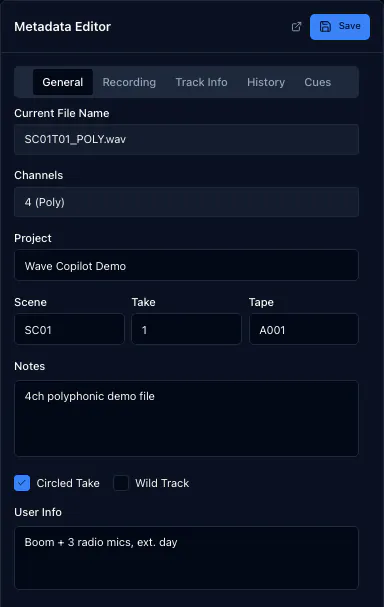
Batch metadata

bEXT and iXML across every file at once

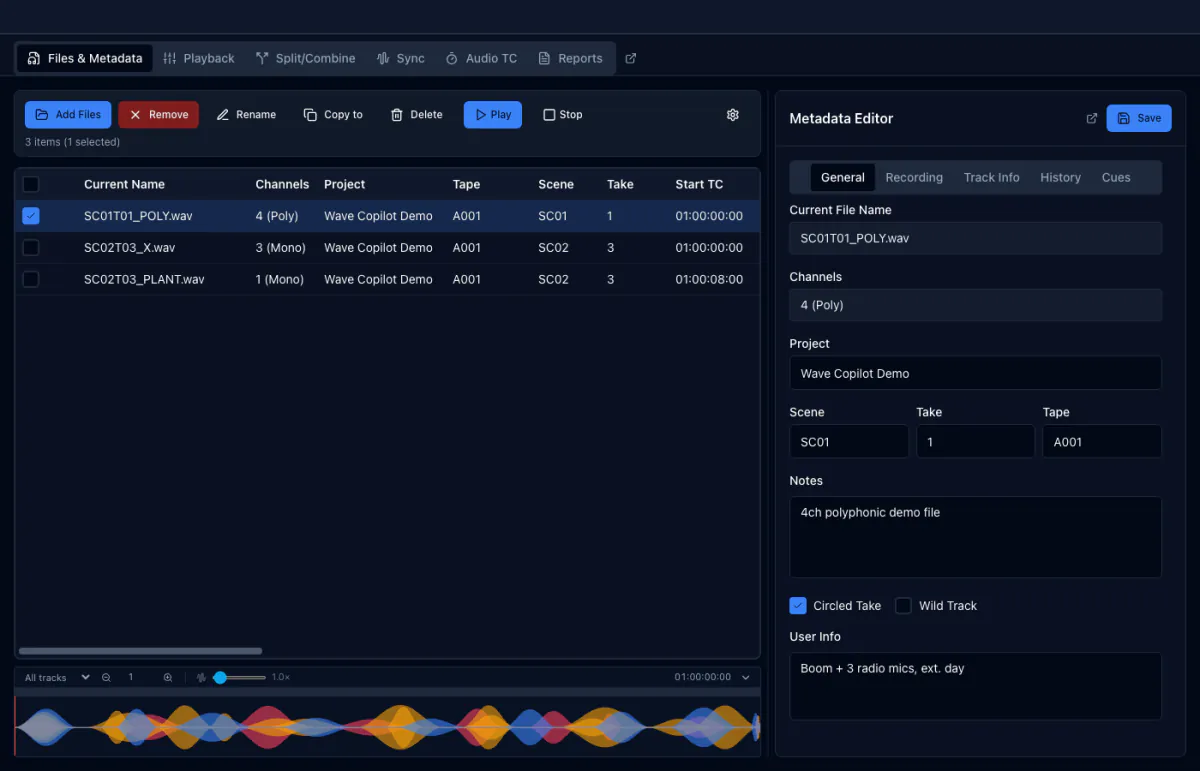
Select a whole card and set scene, take, tape, notes and track names in one pass. Wave Copilot writes bEXT and iXML together, so the fields survive into your NLE and your reports.

See it in action ↓

Sound reports

PDF and CSV, templated

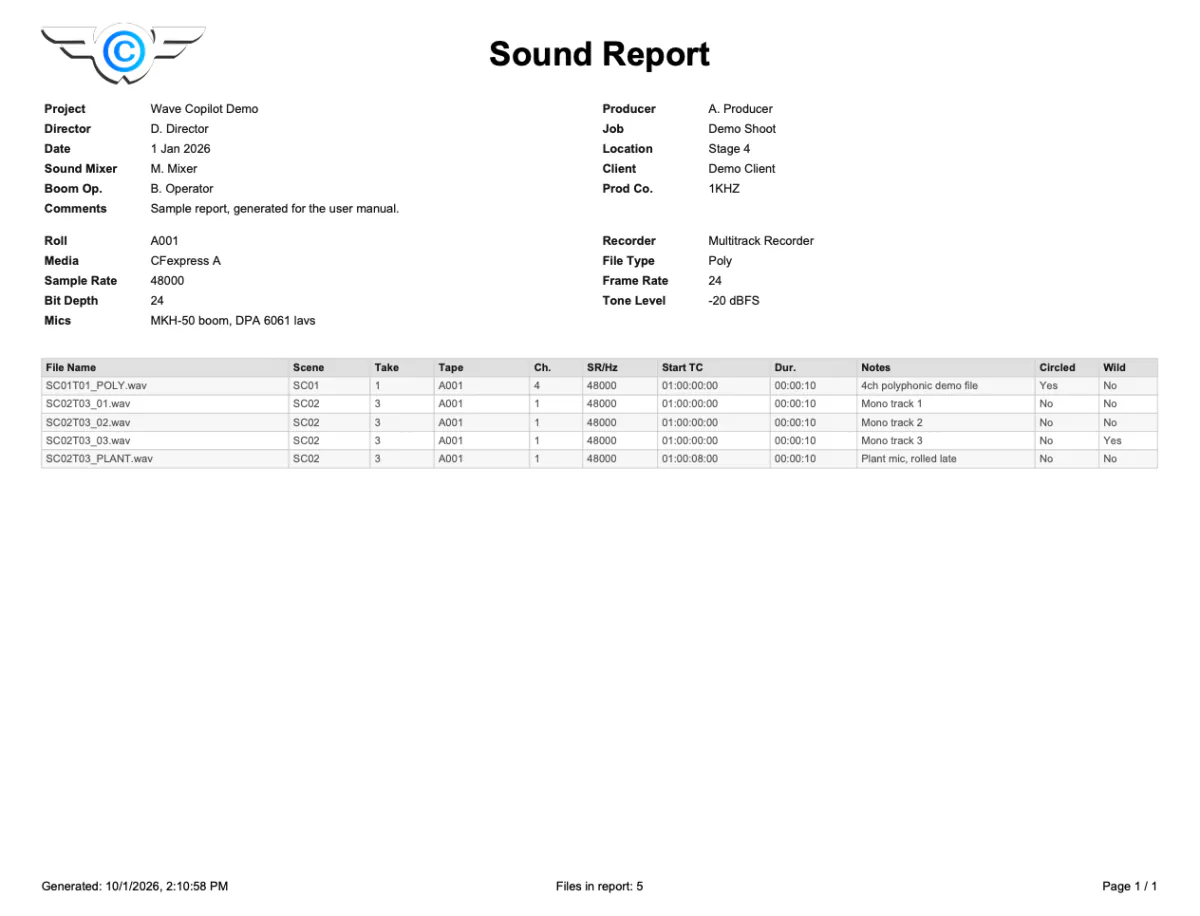
PDF and CSV with your own columns, header block and saved templates. The report that leaves with the rushes looks the same on every job.

See it in action ↓

Convert formats

Rate, depth, dither, MP3, AAC

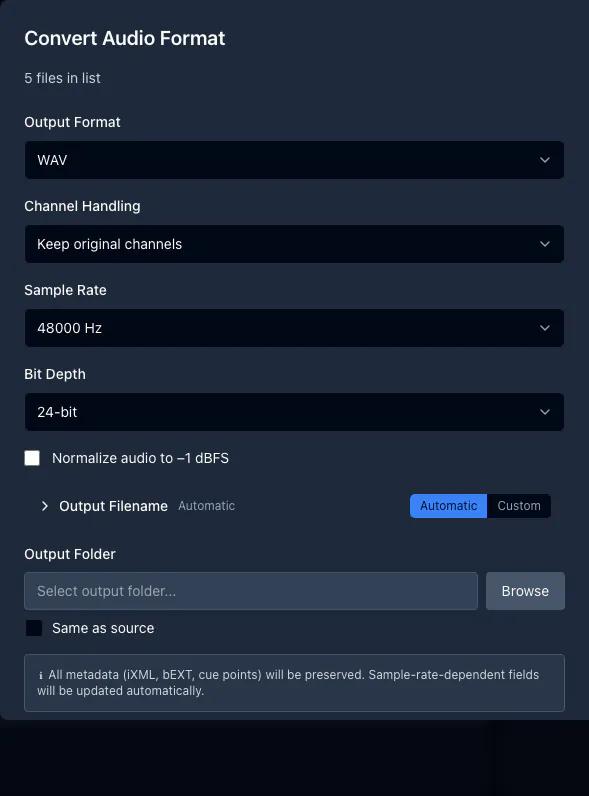
Change sample rate, bit depth and dither, or bounce to MP3 and AAC for dailies. Originals are never touched; every conversion is written alongside them.

See it in action ↓
Audio TC

Timecode for a rig that never had any

Jam a generator onto a spare track, record a few seconds, then shoot. Wave Copilot finds the burst, decodes it, and writes real BWF timecode into the file. From there it conforms, syncs and drops into an NLE already lined up.

Conform

Rescue the take that only made it to the backup

A body pack ran all day; your recorder cut between takes. Wave Copilot trims the backup to every take by timecode, replaces a single bad channel inside a poly, or pulls a take the main recorder missed entirely.

Sync by Audio

Align recordings that share no clock

Cross-correlation of the actual audio, with a confidence score per file. Nudge by a frame or a millisecond, check it by ear through one synchronised mix, then write proper timecode into the originals.

Mixer + Automix

Sixty-four channels, mixed for you

A full console on every polyphonic file, with Automix riding the faders while you review. Gain Sharing moves continuously; Intelligent Gate opens only the channels genuinely being spoken into. Export the result as a stereo or mono mixdown.

Split + Combine

Take the file apart, or put it back together

Split any polyphonic WAV into one mono file per channel, or go the other way and merge mono files, two polys, or a mixed pile of both into a single polyphonic file. Grouping happens automatically by timecode and length, you can reorder the channels before anything is written, and timecode, metadata and track names follow every channel through the operation. The originals are never modified.

Metadata

Type it once, write it to the whole card

Select any number of files and set scene, take, tape, project, notes and track names in a single pass. Wave Copilot writes bEXT and iXML together, so the fields survive into your NLE and straight through to the sound report, instead of being retyped at every stage.

Naming

Your naming convention, applied to everything

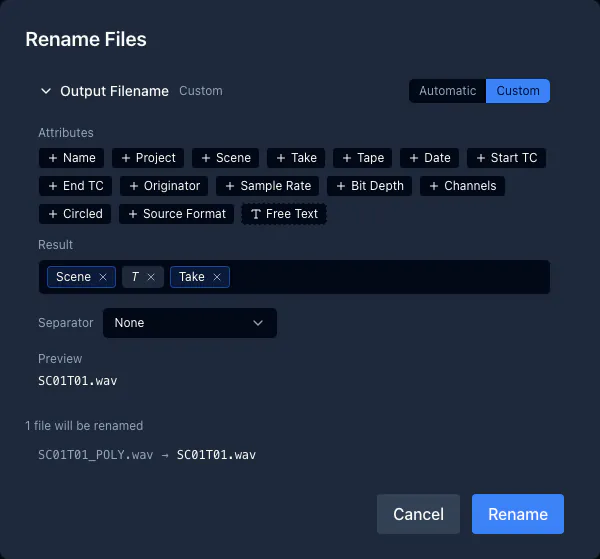
Build a scheme from metadata blocks: scene, take, tape, date, timecode, track name, plus free text, with a live preview. Every operation that writes a file remembers its own template.

Convert

Deliveries in whatever format the job asks for

Change sample rate, bit depth and dither in batch, or bounce to MP3 and AAC for dailies and phone reviews. Metadata and timecode carry across the conversion instead of being dropped, and every converted file is written alongside the original, which is left exactly as it was recorded.

Sound Reports

Hand over the report before you pack the cart

PDF and CSV, with your own columns, header block and saved templates, so the report that leaves with the rushes looks the same on every job.

Details

Collapsed so the page stays short, still on the page for search.

Technical specifications
Formats inWAV, Broadcast WAV, RF64, multi-mono sets
Formats outWAV, BWF, RF64, MP3, AAC (M4A)
ChannelsUp to 64 per polyphonic file
Sample rates44.1 to 192 kHz
Bit depths16, 24, 32-bit int, 32-bit float
Timecode23.97, 24, 25, 29.97, 30 fps, drop and non-drop
PlatformsWindows, macOS, Linux
Full user manual
Every feature documented, with screenshots, searchable and free to read before you buy. Open the manual.
What’s new
Version 1.1.0, released August 24, 2026. Every change in every release, including what was fixed. Read the release notes.
System requirements
Windows 10+ 64-bit. macOS 10.15 Catalina or later, Intel or Apple Silicon. Linux 64-bit: Ubuntu 20.04+, Debian 11+, Fedora 36+. 4 GB RAM minimum, 8 GB recommended. 200 MB disk space.
Does it change my original recordings?
Only when you ask. Metadata edits write in place by design; everything else writes new files.
Will it open my recorder’s files?
If it writes Broadcast WAV, yes: poly, mono, multi-mono sets, RF64 past 4 GB, 32-bit float.
Do I need an internet connection?
Only to activate. After that it runs offline, which is the point on location.
Can I move my licence?
Yes. Deactivate on the old machine, activate on the new one.
My transmitter timecode is slightly off. Can I still replace the iso tracks?
Yes, in two steps. Align the transmitter files in the Sync tab and write the corrected timecode back, then run Track Replace, which matches to the sample. Full steps.
My recorder writes the mix as a separate 32-bit float file. Can I get one poly per take?
That is exactly what Combine Poly does. It pairs each mix to its iso file by timecode and runs a whole day in one click, with the mix placed before or after the isos. Full steps.
Can the merged poly be trimmed to my reference file instead of the longest clip?
Yes, with Conform in Match Reference mode and Poly WAV Output enabled. Every take lands on exactly the reference window, and transmitters that started late are padded with silence. Full steps.
Can I export a poly with some channels removed?
Yes, in one pass. In Split Poly, select just the channels you want on a single output row and clear the rest. For a whole day of takes, Track Replace drops the same channels from every loaded poly in one click. Track names follow the new layout. Full steps.
Can I change the track order of a poly file?
Not in place, but Split Poly followed by Combine Mono puts the tracks in any order you like. Channel order is freely arranged in every tool that builds a new poly. Full steps.
I have five takes but only one long file off the transmitter card. Do I have to split it?
Usually not. Track Replace reads a continuous recording and finds each take inside it on its own, so you only split when clock drift means each take needs its own audio alignment. Full steps.
What if I only recorded transmitters, with no reference file?
Use Conform in Custom TC Range mode to cut a poly to any timecode window you type. Files with no timecode at all get it first from Audio TC or Sync by Audio. Full steps.

Download the free trial

The same build for every platform. 14 days, every feature, no credit card. Your licence key unlocks the app you already installed.

Every feature is documented, free to read before you buy. Open the user manual.

Currently version 1.1.0, released August 24, 2026. See what changed.

macOS

Universal, Apple Silicon and Intel · macOS 11+

Download .dmg Signed and notarised

Windows

64-bit · Windows 10 and 11

Download installer

Linux

x86-64 · AppImage or .deb

Download AppImage

Get your evenings back.

Download the trial, point it at yesterday’s card, and see how long the whole handover takes.